In short
Etsy connects to MyParcel from the Integration page in your MyParcel backoffice, there is nothing to install. You give MyParcel permission once in your Etsy account. After that you import your open Etsy orders into MyParcel with one click, they arrive as draft shipments, and you create the labels in your MyParcel backoffice. MyParcel sends the barcode back to Etsy and marks the order as shipped. Linking is free.
Quickstart, your first Etsy orders in 5 minutes
Enough to link Etsy to MyParcel today. For the details, see Looking for… below.
- Account. Don't have a MyParcel account yet? Create one at myparcel.nl/register.
- Open the integration. In backoffice.myparcel.nl go to Shop settings → Integration, scroll to External links and open Etsy.
- Give permission. Click Give permission, log in to Etsy if asked and click Grant access.
- Set your package type. Choose the default package type for imported orders under Shop settings → Shipments.
- Import your orders. In the Shipments overview, click Import external orders, select your Etsy orders and import them.
You're done when you see this
- The message Etsy is linked. and a red Revoke permission button on the Etsy panel
- MyParcel listed under Apps You Use in your Etsy account
- Your Etsy orders in the Shipments overview as draft shipments
Looking for…
| What do you want to do? | Go to |
|---|---|
| Understand how the connection works | 1 · How the connection works |
| Link your Etsy shop | 2 · Linking Etsy |
| Set the package type for imported orders | 3 · Default package type |
| Import orders and print labels | 4 · Daily use |
| Disconnect Etsy | 5 · Disconnecting |
| Something's not working | 6 · Something's not working, diagnostics |
| Answer to a frequently asked question | 7 · FAQ |
1 · How the connection works
Etsy is a marketplace, so there is no plugin or app to install. You link your Etsy shop once from your MyParcel backoffice and give MyParcel permission in your Etsy account. MyParcel then talks to Etsy on your behalf.
You fetch your open Etsy orders yourself and they arrive in MyParcel as draft shipments. You create the labels in your MyParcel backoffice, and MyParcel sends the barcode back to Etsy and marks the order as shipped.
The link uses the Etsy API, but MyParcel is not endorsed or certified by Etsy.
2 · Linking Etsy
- Log in to backoffice.myparcel.nl and go to Shop settings → Integration.
- Scroll down to External links and open Etsy with the + button.
- Click Give permission.
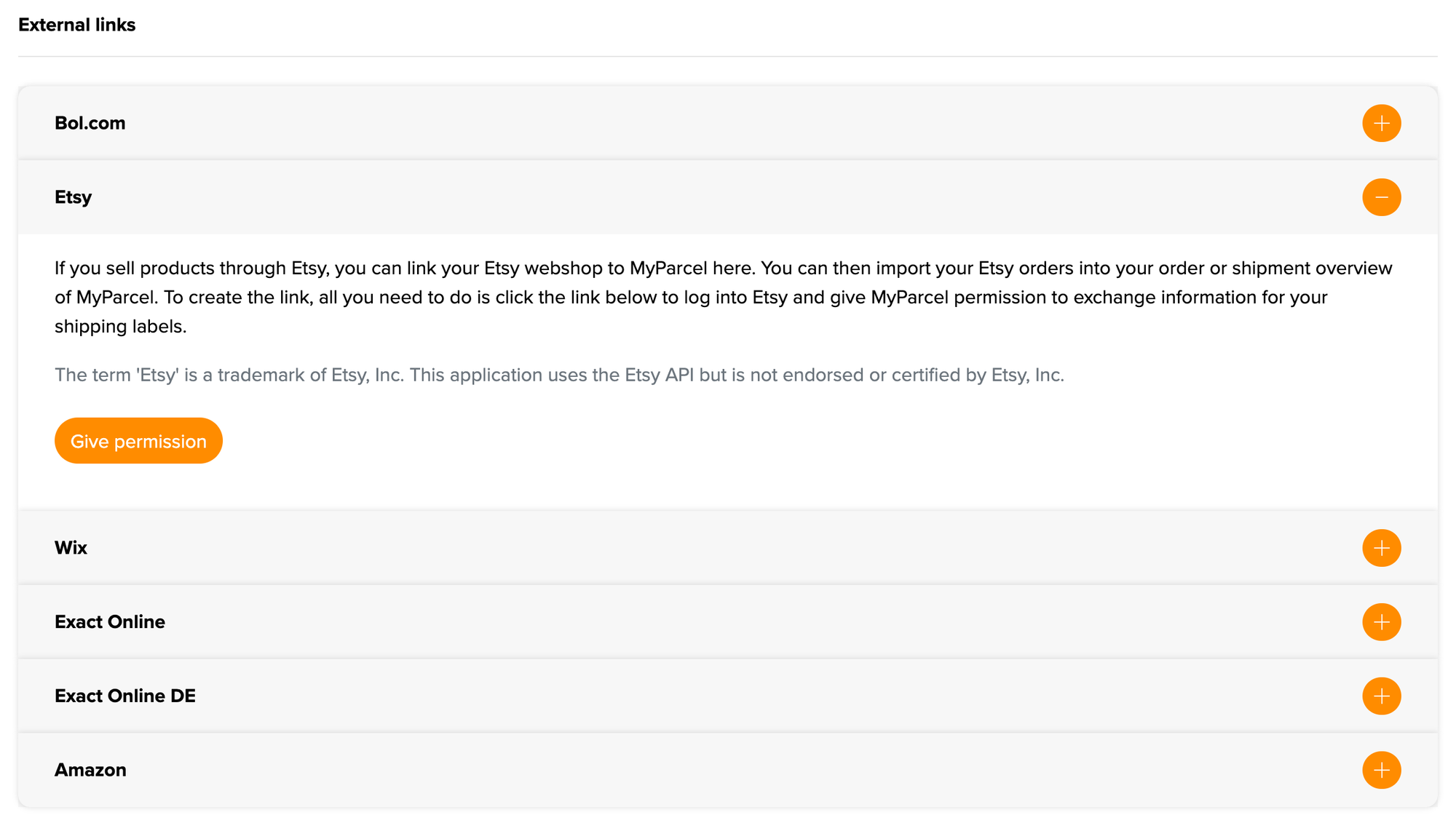
- You are sent to Etsy. Log in with the Etsy account of your shop if Etsy asks you to.
- Etsy shows which permissions MyParcel asks for. Click Grant access.
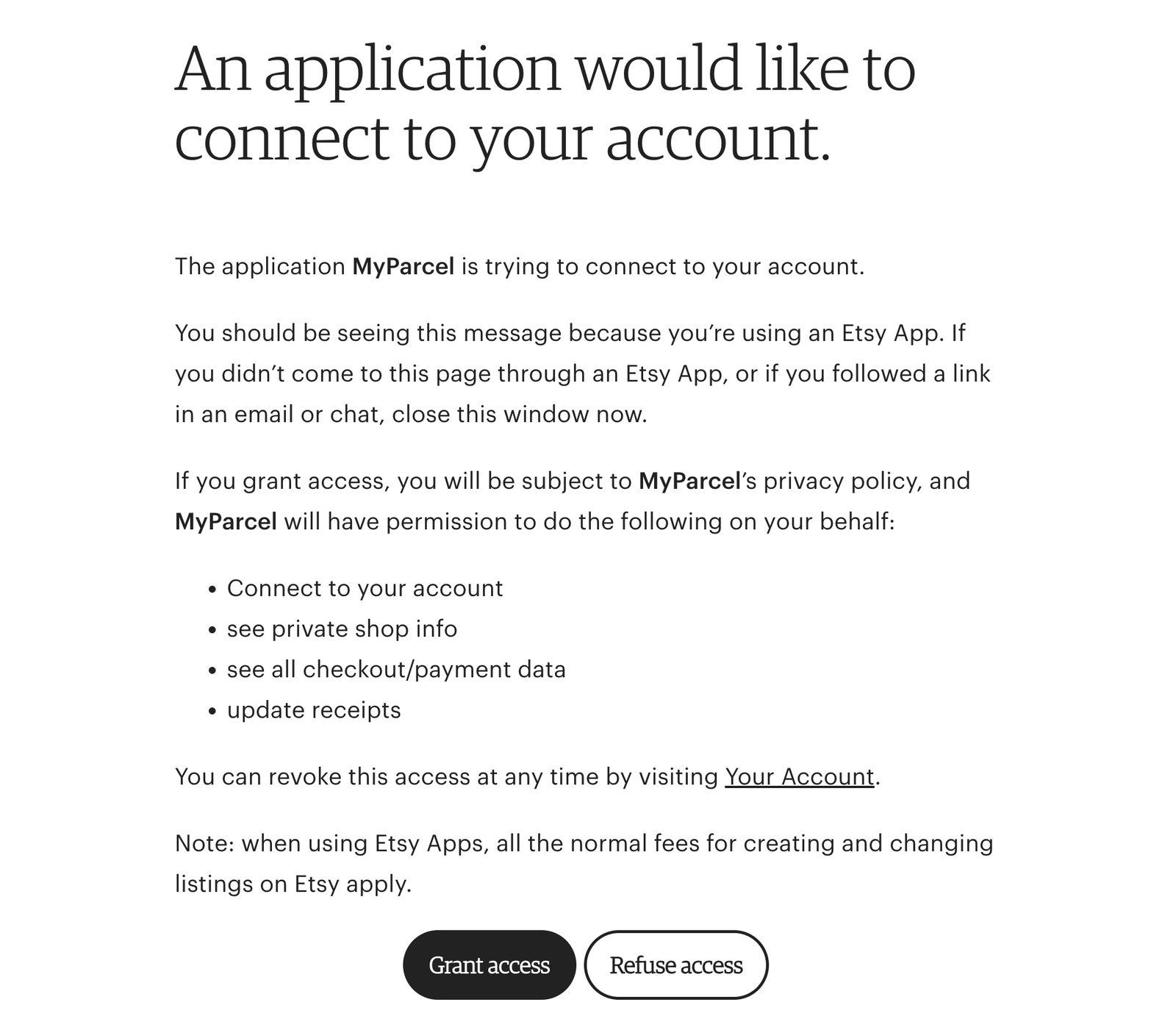
MyParcel asks for these permissions:
| Permission | Why MyParcel needs it |
|---|---|
| Connect to your account | To link your Etsy shop to your MyParcel shop. |
| see private shop info | To read your shop details. |
| see all checkout/payment data | To read your orders and the delivery address. |
| update receipts | To send the barcode back and mark the order as shipped. |
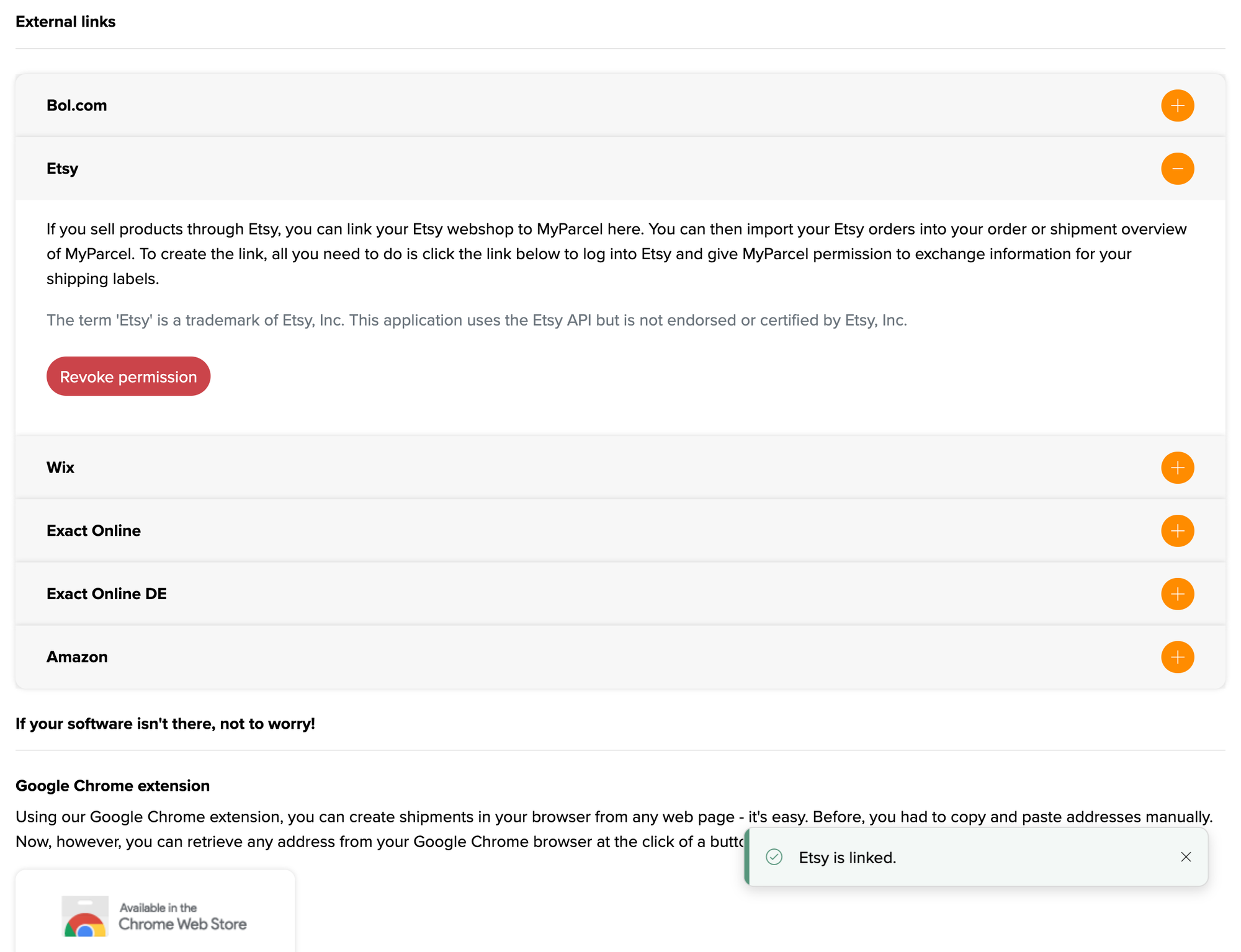
Back in your MyParcel backoffice you see the message Etsy is linked. The button on the Etsy panel has changed into a red Revoke permission.
Only start from MyParcel
Only open the Etsy permission page through Give permission in your MyParcel backoffice. Etsy itself warns you to close the page if you reached it through a link in an email or chat.
3 · Default package type
Imported Etsy orders arrive as a standard shipment. Which package type that is, for example a package or a mailbox package, is set under Shop settings → Shipments in your MyParcel backoffice. Set it before your first import.
You can change a single shipment after importing, see §4.
4 · Daily use
- In your MyParcel backoffice, open the Shipments overview and click Import external orders.
- Your open Etsy orders are listed. Select the orders you want to ship and click Import.
- The orders arrive as draft shipments. Click the pencil behind a shipment to change it, for example the package type or the delivery options.
- Create the labels and hand the parcels to the carrier.
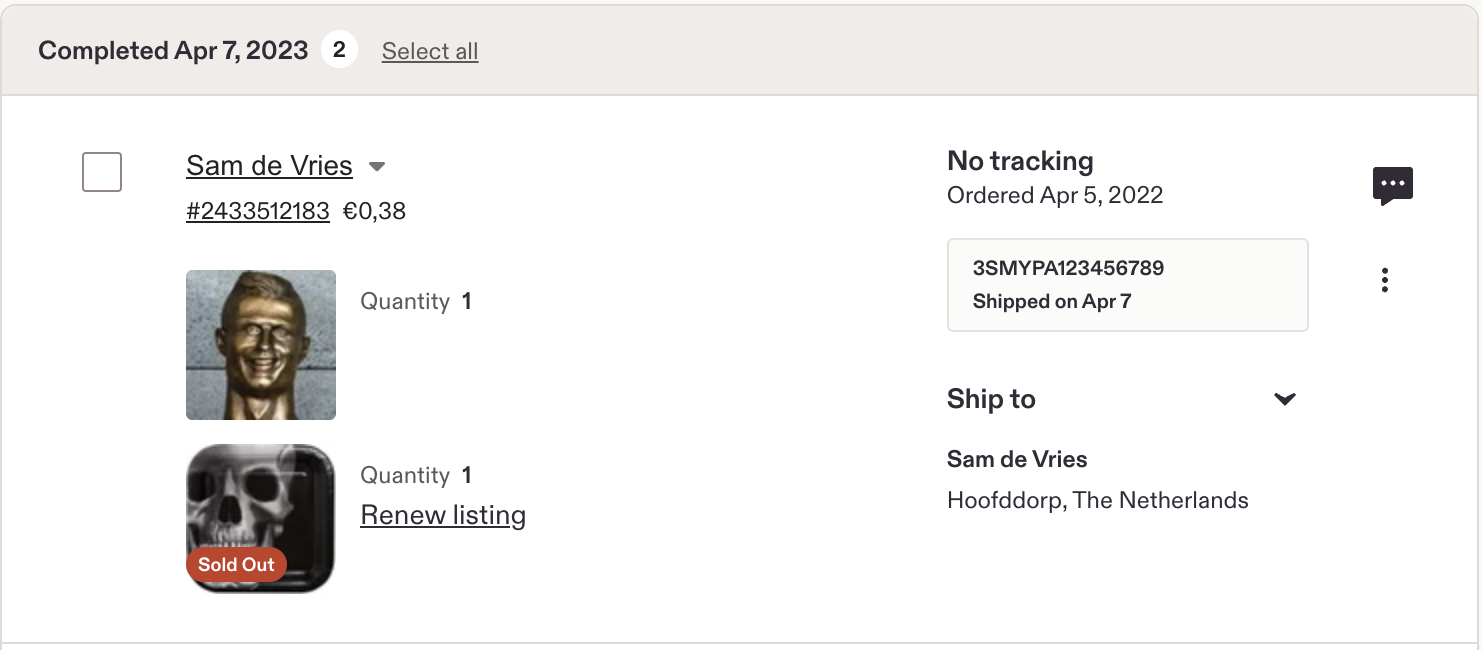
As soon as the label is printed, MyParcel sends the barcode to Etsy and the order is marked as shipped. In your Etsy order overview you see the barcode on the order, with the shipping date.
Shipments outside the EU
You can import orders for addresses outside the EU, but the customs form is not filled in completely. Check and complete the customs details on the draft shipment before you create the label.
You are only billed once a shipment is actually handed over to the carrier.
5 · Disconnecting
You can end the link in two places:
- In MyParcel. Go to Shop settings → Integration → External links → Etsy and click Revoke permission.
- In Etsy. Go to your account settings, open Apps and click Revoke next to MyParcel. Under Third Party Apps to which you've granted access you also see when you gave permission.

Want to link again later? Click Give permission in your MyParcel backoffice and grant access once more.
6 · Something's not working, diagnostics
Run through this table top to bottom, most issues are fixed within a few minutes.
| Symptom | What to check |
|---|---|
| The Etsy panel still shows Give permission | The link was not completed. Click Give permission again and click Grant access in Etsy (§2). |
| Etsy shows the wrong account | You are logged in to Etsy with another account. Log out of Etsy, log in with the account of your shop and start again from MyParcel. |
| No orders appear when importing | Only open orders are imported. Check that the order is not yet marked as shipped in Etsy, and that MyParcel is still listed under Apps in your Etsy account (§5). |
| Imported orders get the wrong package type | Check the default under Shop settings → Shipments (§3), or change the draft shipment before you create the label. |
| The barcode does not show up in Etsy | The barcode is sent once the label is printed. Did you mark the order as shipped in Etsy yourself before that? |
| Customs error on a shipment outside the EU | Complete the customs details on the draft shipment (§4). |
7 · FAQ
Do I need to install anything?
No. Etsy connects from your MyParcel backoffice, there is no plugin or app.
Does it cost anything?
Linking Etsy is free. You pay for your shipments as usual.
Are orders imported automatically?
No. You fetch your open Etsy orders yourself with Import external orders in the Shipments overview.
Do you send the barcode back to Etsy?
Yes. Once the label is printed, MyParcel sends the barcode to Etsy and marks the order as shipped.
How do I stop the link?
Click Revoke permission in your MyParcel backoffice, or Revoke under Apps in your Etsy account (§5).
Resources & support
- backoffice.myparcel.nl ↗, integration, shipments, account and billing.
- Ship your Etsy orders with MyParcel ↗.
- Contact MyParcel support, 023 - 30 30 315 · info@myparcel.nl.
This manual describes the Etsy link in the MyParcel backoffice as it works in October 2026. Screens on the Etsy side can differ slightly per account language.